
The guide on how to configure FRP and WireGuard to connect to a server behind a firewall.
FRP is a fast reverse proxy that helps you expose a local server behind a NAT or firewall to the internet. This guide will walk you through the installation and configuration process for both server and client sides.
Server Installation
1. Download and Extract FRP
wget https://github.com/fatedier/frp/releases/download/v0.62.1/frp_0.62.1_linux_amd64.tar.gz
tar zxvf frp_0.62.1_linux_amd64.tar.gz
cd frp_0.62.1_linux_amd64
2. Optional: Install Binaries System-wide
install -m 0755 frps /usr/local/bin/
install -m 0755 frpc /usr/local/bin/
Server Configuration
1. Create Server Configuration
Create and edit the server configuration file:
nano frps.toml

# Add the following configuration:
bindPort = 7000
auth.token = "secret123121515601ad6as1d5a6=asd93221"
2. Start the Server
frps -c frps.toml
Client Configuration
1. Create Client Configuration
Create and edit the client configuration file:
nano frpc.toml

# Add the following configuration:
serverAddr = "XX.XX.XX.133"
serverPort = 7000
auth.token = "secret123121515601ad6as1d5a6=asd93221"
loginFailExit = false

[[proxies]]
name = "proxy1"
type = "udp"
localIp = "127.0.0.1"
localPort = 51820
remotePort = 54415
transport.useEncryption = true
transport.useCompression = true
2. Start the Client
./frpc -c frpc.toml
Testing the Connection
1. Using Netcat
To test the connection, you can use netcat:
# On the server:
ncat -lk 1234
"hello"

# On the client:
ncat 192.168.88.138 1234
'hello'
2. Monitoring Traffic
To monitor the traffic, use ngrep:
sudo ngrep -q -d lo hello
Remember to replace the IP addresses and tokens with your own values in a production environment.
WireGuard Configuration with FRP
When you have a WireGuard server behind a NAT or firewall without open ports, you can use FRP to expose it. This section explains how to configure WireGuard to work with FRP.
1. WireGuard Server Configuration
Configure your WireGuard server with the following settings, paying special attention to the Address (/32) and Endpoint (PUBLIC-IP:54415) values:
[Interface]
Address = 10.13.13.5/32
PrivateKey = MGU4VttRv1/ICa51561d5611265F+viCa3fs6GCGY=
ListenPort = 51820
DNS = 10.13.13.1

[Peer]
PublicKey = mZoadSsyD/1T0cmn/ONz3wDz8VSFB51asd6112aQD/SWBDRVs=
PresharedKey = Rgdo6E8zIiPndaioqh6co120a51dsa61d1as6TNz+dtTqJM=
Endpoint = publicIP:54415 # Replace with your FRP server's public IP and port (54415) screenshot unifi
AllowedIPs = 0.0.0.0/0
PersistentKeepalive = 25
2. Important Configuration Notes
- The Address field uses a /32 subnet mask to specify a single IP address
- The Endpoint should match your FRP server's public IP and the remote port configured in frpc.toml (54415)
- The AllowedIPs = 0.0.0.0/0 setting allows all traffic to be routed through the VPN
- With this we will have an IP from the wireguard server, not from the server frp server
Port forwarding for WireGuard on Unifi
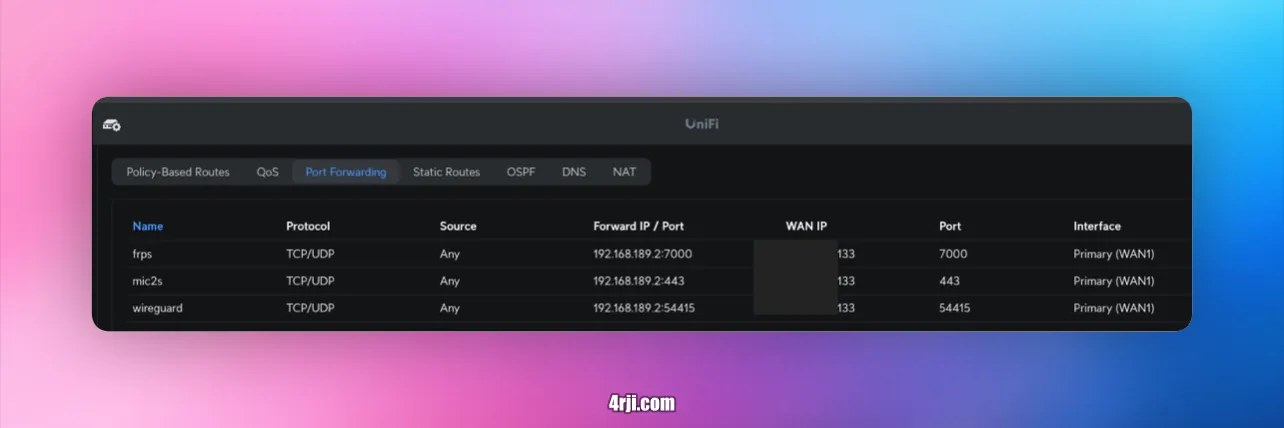
For more detailed information about WireGuard configuration, visit our WireGuard documentation.