
Scripts Used for Machine Hardening During the CCDC Competition
During the Collegiate Cyber Defense Competition (CCDC), we utilized a series of scripts to harden our machines against various cyber threats. These scripts played a crucial role in enhancing the security and resilience of our systems throughout the competition.
CCDC script
This script creates a user-friendly configuration menu to help you select and run scripts stored in the $HOME/ccdc directory. It shows the available scripts in a list, allowing you to choose one to execute with administrator privileges (using sudo). If the selected script is executable, it runs automatically; otherwise, it notifies you about any permission issues. This makes managing and configuring your Linux system simple and fast.
❯ ccdc

┌────────────────────────────────────────┐
│                                        │
│                                        │
│                                        │
│   :####:    :####:  #####:      :####: │
│   ######    ######  #######     ###### │
│ :##:  .#  :##:  .#  ##  :##:  :##:  .# │
│ ##        ##        ##   :##  ##       │
│ ##.       ##.       ##   .##  ##.      │
│ ##        ##        ##    ##  ##       │
│ ##        ##        ##    ##  ##       │
│ ##.       ##.       ##   .##  ##.      │
│ ##        ##        ##   :##  ##       │
│ :##:  .#  :##:  .#  ##  :##:  :##:  .# │
│   ######    ######  #######     ###### │
│   :####:    :####:  #####:      :####: │
│                                        │
│                                        │
│                                        │
│                                        │
└────────────────────────────────────────┘

No for competition. For learning purposes only.
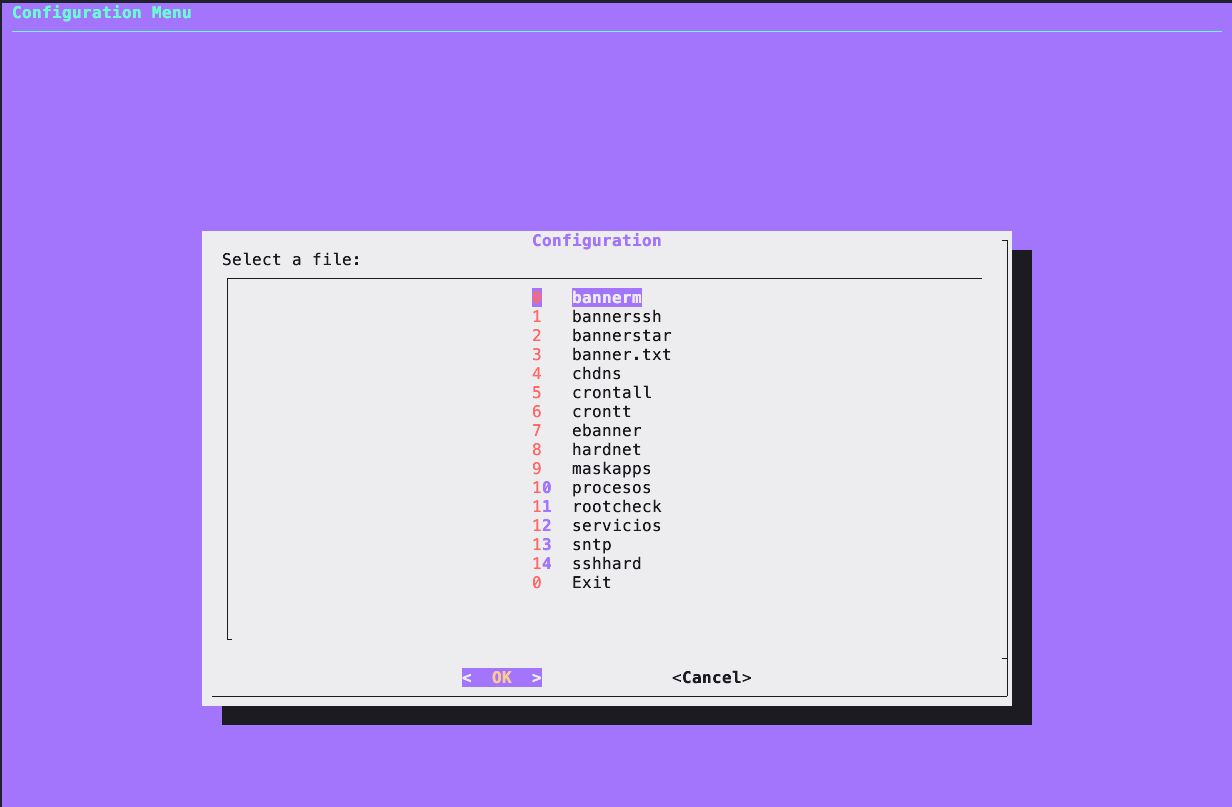
Scripts
bannerssh
The script disables dynamic MOTD scripts, asks the user if they want to modify the welcome message, and if so, adds a customized message to the MOTD file. It then informs the user of the file's location for manual modifications.
#!/bin/bash
echo ""
# Deshabilita los scripts dinámicos del MOTD moviéndolos a otra ubicación
for file in /etc/update-motd.d/*; do
    if [[ ! "$file" =~ ".disabled" ]]; then
        sudo mv "$file" "${file}.disabled"
    fi
done

# Pregunta al usuario si desea modificar el mensaje de bienvenida
read -p "¿Quieres modificar el mensaje de bienvenida? (s/n): " respuesta
echo ""
if [[ $respuesta =~ ^[Ss]$ ]]; then
    # Pregunta al usuario por el nuevo mensaje de bienvenida
    echo ""
    # Añade el mensaje personalizado antes del mensaje estático
    mensaje_personalizado="
    UNAUTHORIZED ACCESS TO THIS DEVICE IS PROHIBITED

⠀⠀⠀⠀⠀⠀⠀⠀⣀⣤⣴⣶⣾⡿⠿⠿⠿⣷⣶⣦⣤⣀⠀⠀⠀⠀⠀⠀⠀⠀
⠀⠀⠀⠀⣠⣴⡿⠟⣋⣩⣴⣶⡆⠀⠀⢰⣶⣦⣍⣙⠻⢿⣦⣄⠀⠀⠀⠀⠀
⠀⠀⠀⣠⣾⡿⠋⠰⡾⠟⠋⠉⠀⠀⣀⣀⠀⠀⠉⠙⠻⢿⠆⠙⢿⣷⣄⠀⠀
⠀⠀⣴⡿⢋⡀⠀⠀⠀⠀⠀⠀⠀⠀⣿⣿⠀⠀⠀⠀⠀⠀⠀⠀⢀⡙⢿⣦⠀⠀
⠀⣼⡿⢡⣾⠏⠀⠀⢾⣷⣄⠀⠀⠀⣿⣿⠀⠀⠀⣠⣾⡷⠀⠀⠹⣿⡌⢿⣧⠀
⢰⣿⢃⣾⡏⠀⠀⠀⠀⠙⢿⣷⣤⣶⣿⣿⣶⣤⣾⡿⠋⠀⠀⠀⠀⢹⣷⡘⣿⡆
⣾⡿⠸⠿⠀⠀⠀⠀⠀⠀⢠⣿⣿⣿⣿⣿⣿⣿⣿⣿⡄⠀⠀⠀⠀⠀⠀⠿⠇⢻⣷
⣿⡇⠀⠀⠀⢸⣿⣿⣿⣿⣿⣿⣿⣿⣿⣿⣿⣿⣿⣿⣿⣿⣿⣿⣿⣿⡇⠀⠀⠀⢸⣿
⢿⣧⢰⣶⠀⠀⠀⠀⠀⠀⠘⣿⣿⣿⣿⣿⣿⣿⣿⣿⠃⠀⠀⠀⠀⠀⠀⣶⡆⣼⡿
⠸⣿⡌⢿⣇⠀⠀⠀⠀⣠⣾⡿⠛⠿⣿⣿⠿⠛⢿⣷⣄⠀⠀⠀⠀⣸⣿⢡⣿⠇
⠀⢻⣷⡘⣿⣆⠀⠀⢾⡿⠋⠀⠀⠀⣿⣿⠀⠀⠀⠙⢿⡷⠀⠀⣰⣿⢃⣾⡟⠀
⠀⠀⠻⣷⣌⠁⠀⠀⠀⠀⠀⠀⠀⠀⣿⣿⠀⠀⠀⠀⠀⠀⠀⠀⠈⣡⣾⠟⠀⠀
⠀⠀⠀⠙⢿⣷⣄⠰⣷⣦⣄⣀⠀⠀⠉⠉⠀⠀⣀⣠⣴⣾⠆⣠⣾⡿⠋⠀⠀⠀
⠀⠀⠀⠀⠀⠀⠙⠻⣷⣦⣍⣙⠻⠿⠇⠀⠀⠸⠿⠟⣛⣩⣴⣾⠟⠋⠀⠀⠀⠀⠀
⠀⠀⠀⠀⠀⠀⠀⠀⠀⠉⠛⠻⠿⢿⣶⣶⣶⣶⡿⠿⠟⠛⠉⠀⠀⠀⠀⠀⠀⠀⠀
    Access to this system is granted by the authority of

    **** Darth Vader himself. ****

    All activities on this system are meticulously scrutinized by the **** Sith Lords. ****
    "

    echo "$mensaje_personalizado" | sudo tee /etc/motd > /dev/null

    echo "El mensaje de bienvenida ha sido configurado."
fi
echo ""
# Informa al usuario sobre la ubicación del archivo para futuros cambios
echo "Puedes modificar el mensaje de bienvenida manualmente en cualquier momento editando el archivo /etc/motd."
chdns
This script displays the current DNS settings, offers options to change DNS to Google's DNS (8.8.8.8) or a custom IP address, and provides options to lock or unlock the `/etc/resolv.conf` file.
#!/bin/bash
echo ""
echo ""
echo "Current DNS"

echo ""
cat /etc/resolv.conf
echo ""

# Function to change DNS to Google
change_dns_google() {
    echo "Commenting all lines in /etc/resolv.conf"
    sudo sed -i 's/^/#/' /etc/resolv.conf
    echo "nameserver 8.8.8.8" | sudo tee -a /etc/resolv.conf
    echo "DNS changed to Google (8.8.8.8)"
}

# Function to change DNS to a specific IP address
change_dns_custom() {
    read -p "Enter the desired DNS IP address: " user_ip
    echo "Commenting all lines in /etc/resolv.conf"
    sudo sed -i 's/^/#/' /etc/resolv.conf
    echo "nameserver $user_ip" | sudo tee -a /etc/resolv.conf
    echo "DNS changed to $user_ip"
}

# Function to lock the /etc/resolv.conf file
lock_dns() {
    sudo chattr +i /etc/resolv.conf
    echo "The /etc/resolv.conf file has been locked."
}

# Function to unlock the /etc/resolv.conf file
unlock_dns() {
    sudo chattr -i /etc/resolv.conf
    echo "The /etc/resolv.conf file has been unlocked."
}

# Selection menu
echo "Select an option:"
echo "1. Change DNS to Google (8.8.8.8)"
echo "2. Change DNS to a custom IP address"
echo "3. Lock DNS"
echo "4. Unlock DNS"
read -p "Option: " option

# Execute the selected option
case $option in
    1) change_dns_google ;;
    2) change_dns_custom ;;
    3) lock_dns ;;
    4) unlock_dns ;;
    *) echo "Invalid option. Exiting." ;;
esac
crontall
This script checks the crontabs of all system users and saves the information to a file named "crontall" in the user's home directory. It then displays the content of this file and prompts the user if they want to delete all crontabs for all users. If confirmed, it proceeds to delete all crontabs and notifies the user.
#!/bin/bash

echo ""


# Check crontabs for all system users and save to a file
output_file="$HOME/crontall"
echo "Crontabs of all system users:" > "$output_file"
for username in $(cut -d: -f1 /etc/passwd); do
    echo "User: $username" >> "$output_file"
    sudo crontab -u $username -l >> "$output_file" 2>&1
    echo "" >> "$output_file"
done

echo ""
# Display the content of the file
cat "$output_file" | less

 echo ""

echo "crontall file created"
# Show the path of the file
echo "Path of crontall: $output_file"


echo ""
echo ""
echo ""


# Ask if the user wants to delete all crontabs
read -p "Do you want to delete crontabs for all users? (y/[enter]) " answer
case $answer in
    [Yy]* )
        for username in $(cut -d: -f1 /etc/passwd); do
            echo "Deleting crontab for user: $username"
            sudo crontab -u $username -r
        done
        echo "All crontabs have been deleted."
        ;;
    * )
        echo "Crontabs not deleted."
        ;;
esac
BajoCOntent
hardnet
This script performs network hardening by modifying the `/etc/sysctl.conf` file with specific configurations. It first backs up the original `sysctl.conf` file. Then, it prompts the user if they want to perform network hardening. If confirmed, it adds network hardening configurations to the file. Afterward, it prompts the user if they want to restart the service to apply the changes immediately. Finally, it provides instructions on how to check the changes and where the backup of the original file is located.
#!/bin/bash

# Backup /etc/sysctl.conf
    sudo cp /etc/sysctl.conf /etc/sysctl.conf.backup
echo ""


# Ask if the user wants to modify /etc/sysctl.conf for Network Hardening
read -p "Do you want to perform Network Hardening in /etc/sysctl.conf? (y/n): " response

# Verify the response
if [[ $response == "y" ]]; then

    # Adjustments in /etc/sysctl.conf
    echo "
net.ipv4.conf.all.accept_source_route=0
net.ipv4.ip_forward=0
net.ipv6.conf.all.disable_ipv6 = 1
net.ipv6.conf.default.disable_ipv6 = 1
net.ipv6.conf.lo.disable_ipv6 = 1
net.ipv4.conf.all.accept_redirects=0
net.ipv4.conf.all.secure_redirects=0
net.ipv4.conf.all.send_redirects=0
net.ipv4.conf.all.rp_filter=2
net.ipv4.icmp_echo_ignore_all = 0
" | sudo tee -a /etc/sysctl.conf

    # Ask if the user wants to restart the service
    read -p "Do you want to restart the service now? (y/n): " restart_response

    # Verify the response about restarting
    if [[ $restart_response == "y" ]]; then
        sudo sysctl --system
    else
        echo "Operation cancelled. Changes will require a reboot to take effect."
    fi

else
    echo "Operation cancelled. No changes were made to /etc/sysctl.conf."
fi
echo ""
echo ""
echo "check changes on:"
echo "cat /etc/sysctl.conf"
echo ""
echo "backup on:"
echo "/etc/sysctl.conf.backup"
echo ""
echo ""
echo ""
echo "**************** END ****************"
BajoCOntent
sshhard
This script backs up the `sshd_config` file, then modifies it according to the specified configurations. It adds or replaces lines as necessary to enforce security measures such as disabling root login, empty passwords, X11 forwarding, and more. After making the changes, it prompts the user if they want to restart the SSH service to apply the modifications immediately. Finally, it displays the current configuration of `sshd` for verification.
#!/bin/bash

# Backup the sshd_config file
sudo cp /etc/ssh/sshd_config /etc/ssh/sshd_config.backup

# Define the lines to search for and insert in the file
lines_to_insert=(
    "PermitRootLogin no"
    "PermitEmptyPasswords no"
    "KerberosAuthentication no"
    "GSSAPIAuthentication no"
    "X11Forwarding no"
    "MaxAuthTries 2"
    "LoginGraceTime 20"
    "PermitUserEnvironment no"
    "AllowAgentForwarding no"
    "AllowTcpForwarding no"
    "PermitTunnel no"
    "MaxSessions 2"
    "Compression no"
    "TCPKeepAlive no"
    "UseDNS no"
    "LogLevel VERBOSE"
    "MaxAuthTries 2"
    "MaxSessions 1"
    "PubkeyAuthentication yes"
    "PasswordAuthentication no"  # Added line
    "Port 2246"  # Added line
)

# Replace or add the specified lines in the sshd_config file
for line in "${lines_to_insert[@]}"; do
    if ! sudo grep -q "^$line" /etc/ssh/sshd_config; then
        echo "$line" | sudo tee -a /etc/ssh/sshd_config
    else
        sudo sed -i "s/^$line.*/$line/" /etc/ssh/sshd_config
    fi
done

# Ask if the user wants to restart the SSH service
read -p "Do you want to restart the SSH service? (y/n): " response

# Verify the response
if [[ $response == "y" ]]; then
    # Restart the sshd service
    sudo service ssh restart
else
    echo "Operation cancelled."
fi

# Show the current configuration of sshd
echo "sudo sshd -T"
sudo sshd -T
BajoCOntent
rootcheck
This script prompts the user to press Enter to execute various `sudo cat` commands to display the contents of several files in the `/root` directory, such as `.bashrc`, `.shrc`, `.cshrc`, `.tcshrc`, `.profile`, and `.bash_profile`. After displaying each file's contents, it prints a line to indicate the end of that section.
#!/bin/bash


        read -p "Press Enter to execute 'sudo cat /root/.bashrc': "
        sudo cat /root/.bashrc

        echo ""
        echo "**************** END ****************"

        echo ""
        read -p "Press Enter to execute 'sudo cat /root/.shrc': "
        sudo cat /root/.shrc
        echo ""
        echo ""
        echo "**************** END ****************"
        echo ""
        read -p "Press Enter to execute 'sudo cat /root/.cshrc': "
        sudo cat /root/.cshrc
        echo ""
        echo ""
        echo "**************** END ****************"
        echo ""
        read -p "Press Enter to execute 'sudo cat /root/.tcshrc': "
        sudo cat /root/.tcshrc
        echo ""
        echo ""
        echo "**************** END ****************"

        echo ""
        read -p "Press Enter to execute 'sudo cat /root/.profile': "
        sudo cat /root/.profile
        echo ""
        echo ""
        echo "**************** END ****************"

        echo ""
        read -p "Press Enter to execute 'sudo cat /root/.bash_profile': "
        sudo cat /root/.bash_profile
        echo ""

        echo ""
        echo "**************** END ****************"
        echo ""
        echo ""
Script Execution: Installation and Usage Demonstration
This video showcases the execution of the scripts and provides a more explicit demonstration of their installation and usage.
Ready, Click here to visit the GitHub repository for the scripts.